Skip to content
Back to Tools
FREE TOOL · FOR US SMALL BUSINESSES

AI Automation Savings Calculator.

See what automation really saves your small business, build cost and running cost included. No inflated ROI.

Built by a working developer who sells this exact work, so the math has to survive a real quote, not just a landing page.

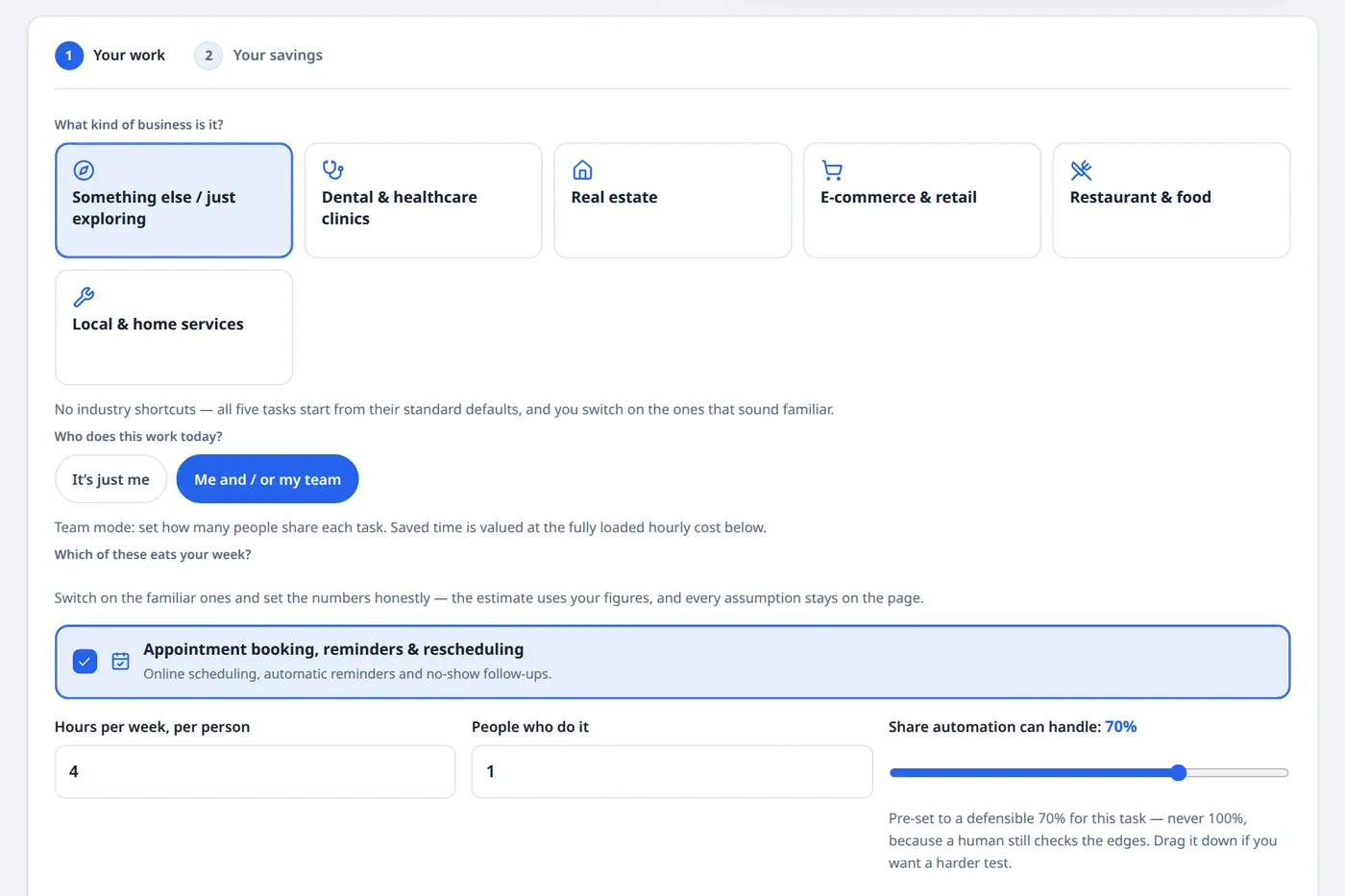
Screenshot of the calculator on this page with an example filled in, appointment booking switched on, 4 hours a week, 70% of it handed to automation
  1. 1Your work
  2. 2Your savings
What kind of business is it?

No industry shortcuts, all five tasks start from their standard defaults, and you switch on the ones that sound familiar.

Who does this work today?

Team mode: set how many people share each task. Saved time is valued at the fully loaded hourly cost below.

Which of these eats your week?

Switch on the familiar ones and set the numbers honestly, the estimate uses your figures, and every assumption stays on the page.

Pre-set to a defensible 70% for this task, never 100%, because a human still checks the edges. Drag it down if you want a harder test.

Fully loaded means the real cost of an hour: wage plus payroll taxes, benefits and overhead, usually 20-40% more than the wage itself. Use your real figure; inflating it only inflates your own result.

What the automation itself costs (both sides, always)

Guided range for the tasks you picked: $1,500-$3,500 one-time, from published US small-business build ranges. The midpoint is filled in; change it if you already have a quote.

Illustrative planning figures (not a verified US market average): $20-$150/month. $49 is prefilled. Use your actual platform and monitoring quote.

Step 1 of 2, no email needed to see your result

How this automation ROI calculator works

Most AI automation ROI calculators ask three questions and print a spectacular number. This one shows its whole method, because the method is where the honesty lives.

1. Count the real time

For every task you switch on: hours per week × the people who do it × the automatable share, the slice a system can realistically take over. That share is a slider you control, pre-set between 55% and 75% depending on the task, because automation never takes 100% of anything a human still has to check.

2. Price both sides

The savings side values recovered hours at your fully loaded hourly cost, wage plus payroll taxes, benefits and overhead. The cost side counts the one-time build and the monthly running cost, every month, for the full year.

3. Read an honest result

ROI here means first-year net divided by total first-year costs: build plus twelve months of running. Payback means the build cost divided by the net monthly saving. Run the same numbers through a calculator that hides the build and you get a number ten times bigger, and worth nothing.

Three worked examples, with the full-cost math

Illustrative small-business scenarios calculated using the assumptions above, not measured customer results. Open the calculator, copy the inputs, and check every line yourself.

1A dental clinic automating appointment booking

18.2 hrshanded back / month
$406modeled time value / month
≈ 6.2 mopayback on the build

The front desk spends 6 hours a week on phone bookings, reminders and rescheduling. At a 70% automatable share and $25/hour fully loaded, that is $455 a month of time handed back. The build sits at the guided midpoint of $2,500 (illustrative planning range $1,500-$3,500) with running costs of $49/month. First-year net after every cost: $2,368, a 77% first-year return. Good, believable, and nobody had to pretend the build was free.
2A one-person business chasing its own invoices

7.8 hrshanded back / month
$263modeled time value / month
≈ 8.6 mopayback on the build

A solo owner spends 3 hours a week sending invoices and following up late payments, owner-operator mode, valuing their own time at $40/hour. At a 60% share, net of the $49 running cost, the saving is $263/month against a $2,250 build: first-year net $903, a 32% return. Modest, and exactly why it is believable. This example values the owner’s time explicitly rather than assuming every saved hour reduces payroll.

3An online store answering questions and re-typing orders

35.3 hrshanded back / month
$833modeled time value / month
≈ 7.5 mopayback on the build

Customer questions take 8 hours a week (55% automatable with an AI assistant trained on the store’s policies) and copying orders between apps takes 5 more (75% automatable), $882 gross, $833/month net at $25/hour. The combined build guide is $3,500-$9,000; at the $6,250 midpoint the first-year net is $3,749, a 55% return with every cost on the table.

Notice what none of these examples does: none claims the software paid for itself in two weeks, and none needs a percentage with a comma in it.

Why most AI ROI calculators overstate your savings

Before you trust any automation savings calculator, including this one, check it for the three tricks below. They are how a $30 subscription turns into a 2,428% return.

The invisible build

The famous four-digit ROI figures divide your savings by the price of an AI subscription and quietly leave out the cost of designing, building, testing and training the automation itself. Implementation appears, if at all, in a footnote. Here, the build is the biggest line in the math, because in real life it is.

The 100% assumption

Many tools assume automation removes the whole task. It does not. A person still handles the exceptions, the complaints and the weird cases, which is why this calculator caps the automatable share at 90%, pre-sets it lower, and lets you drag it down further.

Recovered time counted as fired staff

Some calculators turn every saved hour straight into saved salary. Recovered time is only money when it becomes billable work, faster replies that win jobs, or a hire you avoid. This page values the hour and leaves that call with you, and says so in the FAQ below.

The short version: an AI automation savings calculator should behave like a quote, not like an advertisement. If a tool will not show you its assumptions, it is not estimating, it is pitching.

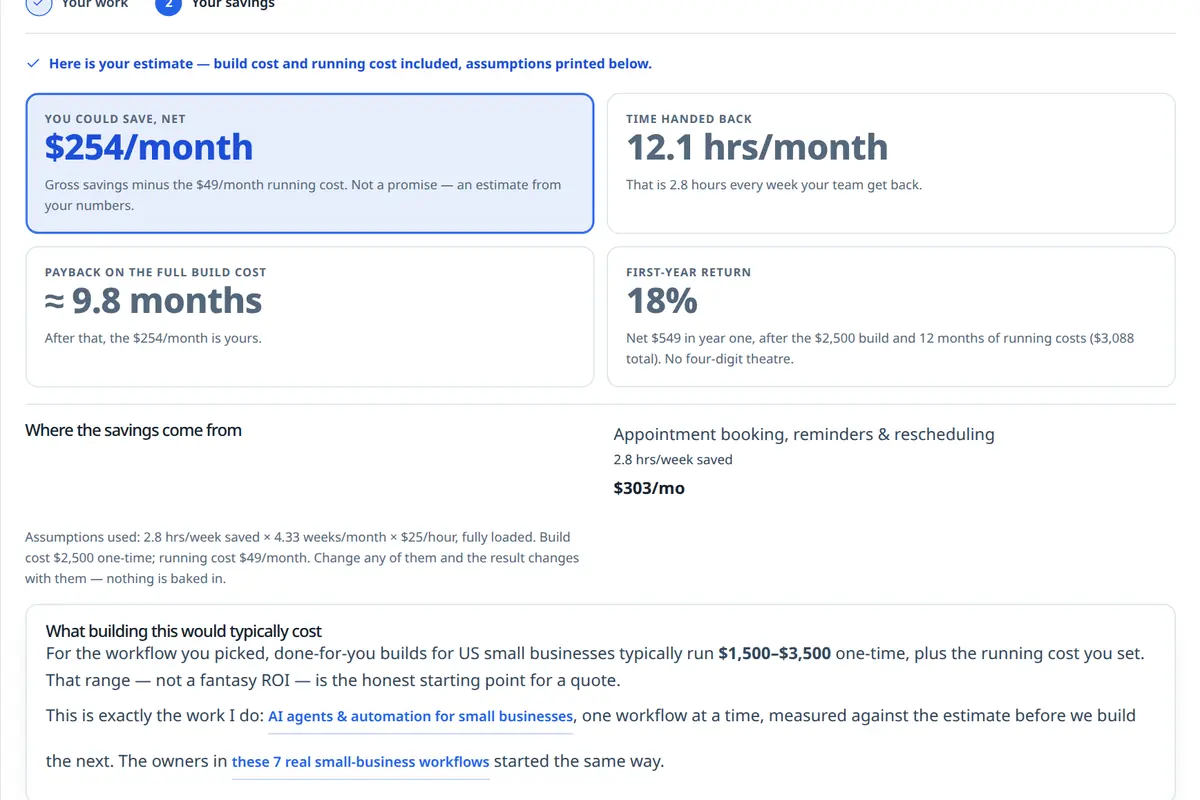
Screenshot of this calculator's own result for that example, $254 a month saved net, 12.1 hours handed back, payback in about 9.8 months, with the breakdown and every assumption printed underneath
No hidden lines: the build, the running cost and the assumptions are all in the math.

What the automation itself costs

The phrase nobody searches calculators for, because almost no calculator exists for it. Yet it is the half of the equation that decides whether the savings are real. Here are the three ways small businesses actually pay for automation, side by side.

DIY with AI subscriptionsDone-for-you buildHybrid
Upfront costNear $0 in cash, your own weekends instead$1,500-$8,000 per workflow, one-timeSmaller build ($800-$3,000) for the core workflow
Monthly cost$20-$100 in subscriptions$20-$150 platforms, AI usage, monitoring$40-$200 subscriptions + light support
Who sets it upYou, prompt by promptA developer, tested against your real workDeveloper builds it; you run the simple parts
Handles wellDrafts, summaries, one-off tasksRepetitive weekly workflows end-to-endOne critical workflow, properly built
Where it falls shortBreaks silently; nobody maintains itCosts real money before it saves anyYou still own the day-to-day tools
Best forTesting whether AI helps at allOwners whose hours are worth more than the buildMost small businesses, honestly

The U.S. Small Business Administration gives the same advice about any business system: budget the running cost, not just the purchase. Automation is no different, which is why both numbers are inputs above, not footnotes.

How much can AI automation save your business?

Scale the examples honestly. A business with one workflow might resemble the first row; a business with several repetitive processes might resemble the last. Neither row is a forecast. All three rows use the same full-cost method as the calculator.

Your situationHours handed backNet modeled time value / monthIllustrative payback
One workflow, small team (dental booking, §1 above)≈ 18 hrs/month≈ $406≈ 6 months
Just you, wearing every hat (invoice chasing, §2)≈ 8 hrs/month≈ $263≈ 9 months
Two workflows stacked (store questions + data entry, §3)≈ 35 hrs/month≈ $833≈ 7-8 months

The dollar amounts above value recovered hours at an assumed hourly rate, then subtract modeled monthly running costs. They are not verified cash savings. A financial benefit depends on whether recovered time creates additional revenue, reduces an actual expense or avoids a future cost.

The pattern matters more than the rows: a later workflow may cost less when integrations can be reused, but complexity and maintenance can also increase costs. That is why the process on my AI agents & automation service page starts with one workflow, measures it for a month, and only then stacks the next, an approach also discussed in these 7 small-business automation workflow examples.

Frequently asked questions

How much can AI automation save my business?

Savings depend on your actual workload, the automatable share, and what happens to recovered staff or owner time. The worked scenarios on this page illustrate roughly 8 to 35 hours a month using chosen assumptions; they are not measured customer results or verified US averages. Enter your own hours and costs, and distinguish time value from cash savings.

How much does AI automation cost for a small business?

Budget for both the one-time implementation and recurring costs such as software, API usage, hosting, monitoring and maintenance. The calculator uses editable planning assumptions, not independently verified US market prices or a binding quote. Request a scope-specific estimate and enter your own expected costs before relying on the result.

Is AI automation worth it for a small business?

When the payback lands inside roughly a year, usually yes, and that is a test you can run above in two minutes with your own numbers. It is worth it when a task is repetitive, rule-based and happens every week: reminders, first replies, chasing payments, copying data. It is not worth it for rare, one-off or judgment-heavy work. Start with the single workflow that wastes the most time, measure it for a month, and only then decide about the next one.

What is a good ROI for AI automation?

There is no universal good ROI percentage. This calculator estimates first-year ROI by subtracting the build and twelve months of operating costs from the value of recovered time, then dividing that net amount by total first-year costs. A negative result means the selected assumptions do not recover the costs in year one. Review cash impact separately: recovered time does not automatically become revenue or payroll savings.

How long does it take for automation to pay for itself?

Divide the build cost by the net monthly saving and you have the payback period. In the worked examples on this page it lands between about 6 and 9 months: a dental clinic’s booking automation pays back in roughly 6.2 months, an owner chasing invoices in about 8.6. If your numbers say payback is several years away, the honest move is to shrink the scope or wait, not to massage the assumptions until the answer looks better.

If automation saves my team time, does it actually save money?

Only if the time goes somewhere useful, that is the part most ROI claims skip. Saved hours turn into money when they become more billable work, faster replies that win jobs, fewer overtime hours, or a hire you no longer need to make. If the recovered hour just becomes a longer lunch, the saving is real for morale but not for the bank account. This calculator values the time honestly and leaves that judgment to you.

What should I automate first?

The task that is repetitive, happens weekly, and follows rules you could write on an index card. For most small businesses that is one of the five in the calculator: appointment booking and reminders, invoice chasing, lead follow-up, answering the same customer questions, or copying data between apps. Pick the one with the most hours attached, automate it well, and let the measured result, not a vendor’s promise, decide what comes next.

Next steps

Run the calculator with your real hours, not the hours you wish you had. If the payback lands inside a year, the workflow is worth a conversation; if it does not, you just saved yourself a purchase, and this page did its job anyway. Pricing a website as well? Use the Small Business Website Cost Calculator to compare project scope and estimated build costs using the same transparent approach. If you are a U.S. business planning implementation, review remote AI automation and SaaS project scoping before requesting an estimate. Or skip the tools and talk through your busiest workflow directly.